
I've now run more than 1,400 LinkedIn profiles against the jobs people actually want. I wanted to take everything I learned from that and hand it to you, so you can make your profile findable for the right jobs, quickly, instead of guessing.
There's a whole industry now built on tailoring your resume. Paste the posting, paste your resume, get a version rewritten for that one job. Do it again for the next one. And the next.
I did some of that. But my interviews didn't come from there. They came from LinkedIn: from being visible, from networking, from everything I was doing on the platform.
Recruiters were finding me. That was never the problem. I post a lot, so I'm visible, and the messages came in steadily. Demand gen roles, which isn't me: I'm a strategist, not a hands-on paid media guru. Manager roles, a couple of levels below where I'd been for years. CMO roles, which, sure, I'll take one, but let's be real, nobody was going to hire me for that. Even the ones I could have done, I was never going to be competitive enough to win.
Then I got to the final round for three roles. All three involved projects. Every time I'd done a project in the past, I got the job, so I put everything into them. Weeks of work, while the networking and the applications and the other things that deserved my time sat there. And I didn't get any of the three.
It was really depressing. But I kept coming back to one thing. You don't get to the final round three times by accident. I was clearly doing something right. I just wasn't quite getting there.
So I looked at those three roles again. Totally different titles. I'd been tight on industry the whole search, but the titles were all over the place: lifecycle, product marketing, engagement, growth, integrated marketing. Mostly director, sometimes senior director or VP. Same person, same skills. My skills just didn't fit neatly in one box; they cut across several. Which meant the titles were never going to tell me anything. The job descriptions would. And underneath the titles, there it was: the same themes. The same kind of work, the same words for it, the same shape.
What I did
I took the shape of those roles and worked backward. What did the three have in common? Which words kept showing up? What would a recruiter type into a search box to find someone for that work?
Then I read how LinkedIn Recruiter search actually works, which almost nobody does. LinkedIn publishes it. I wrote up the full picture in how recruiters find candidates on LinkedIn. The short version:
- The job title filter reads the title field on each job in your Experience section. If the market-standard title for your work isn't in that field, the title filter doesn't see you.
- Keywords and skills are why your headline still matters, a lot. The keyword search reads your whole profile, and the skills filter pulls skills from your headline, your summary, and your job descriptions.
- Open to Work, if you fill in the titles and locations you want, feeds directly into whether you appear when a recruiter searches.
- The new AI search takes a recruiter's plain-language ask and turns it into those same filters.
I also spent a lot of time prompting AI with one question in different forms: how do I show up for roles like these, with a title that matches exactly and the work laid out so a recruiter can see I qualify?
Then I rebuilt my profile around that. The title recruiters search for, in the places their search reads. The shape of the work, up top, instead of buried in a role from years ago.
I still got found for all sorts of things, because I'm visible and I write a lot and that's just what happens. But the relevance changed. The messages started coming from more qualified recruiters, for higher-level roles, for work that actually looked like mine. And that matters, because LinkedIn is where my interviews came from.
And my resume? I used one version for about 90% of the roles I applied to. In the back half of the search, just one. My interviews came from my visibility on LinkedIn: I post, I comment, I work my network, and every one of those people sees my profile long before anyone sees a resume. The profile is the first document. Your resume is tailored to one posting and gets read once. Your profile is tailored to a kind of job and works while you sleep. If you're going for genuinely different kinds of jobs, fine, keep two or three resume versions. But the document that gets you found is the one you're probably not tailoring at all.
What the data says
After I did this for myself, because I am who I am, I reverse-engineered what I'd done and turned it into a free tool. I'm trying to learn AI and vibe coding, and I knew I could spend a couple of hours on this and turn it into something other people could use too.
I got a lot of positive feedback. About 1,500 people clicked on that post. I was like, hmm, maybe I have something here, so I improved it. When Fable came out, I had the new model run through it and help me really tighten it up, and I built a rubric around it. That's JobSearchDx. You paste your profile and the jobs you want, and it flags where the two don't line up. Because it's run more than 1,400 comparisons of real profiles against real jobs, I can see patterns nobody else can. Here's what it shows.
If recruiters keep finding you for the wrong things, you're the majority, not the exception. 41% of profiles scored below 80 out of 100 against postings the person chose themselves. Only 15% scored 90 or above.
You're probably checking your profile the way you'd check a resume, and that's the wrong test. 44% of people pasted a single job posting. But you're almost never after one very specific job. You're after a variety of them, and even the same title in the same industry reads a little different from one posting to the next. One posting's wording is noise; the words that repeat across three or four postings are what a recruiter's filters are built from. Checking against one job tells you how you'd do for that job, which is what your resume is for. The profile has a different job.
You don't need a makeover. You need to fix a few fields. The typical profile had four sections out of alignment, and nobody had more than eight. Headline. Title. About. Current role. Skills. Open to Work. A few setup fields. That's the whole list, and each section you leave misaligned costs roughly five points. Nobody's professional identity is broken. A handful of fields are pointed at the wrong roles.
When people fix those fields, it works, and it works fast. Here's every graded run in this window, side by side: the first look everyone gets, what a second run looks like, and what three or more runs look like.
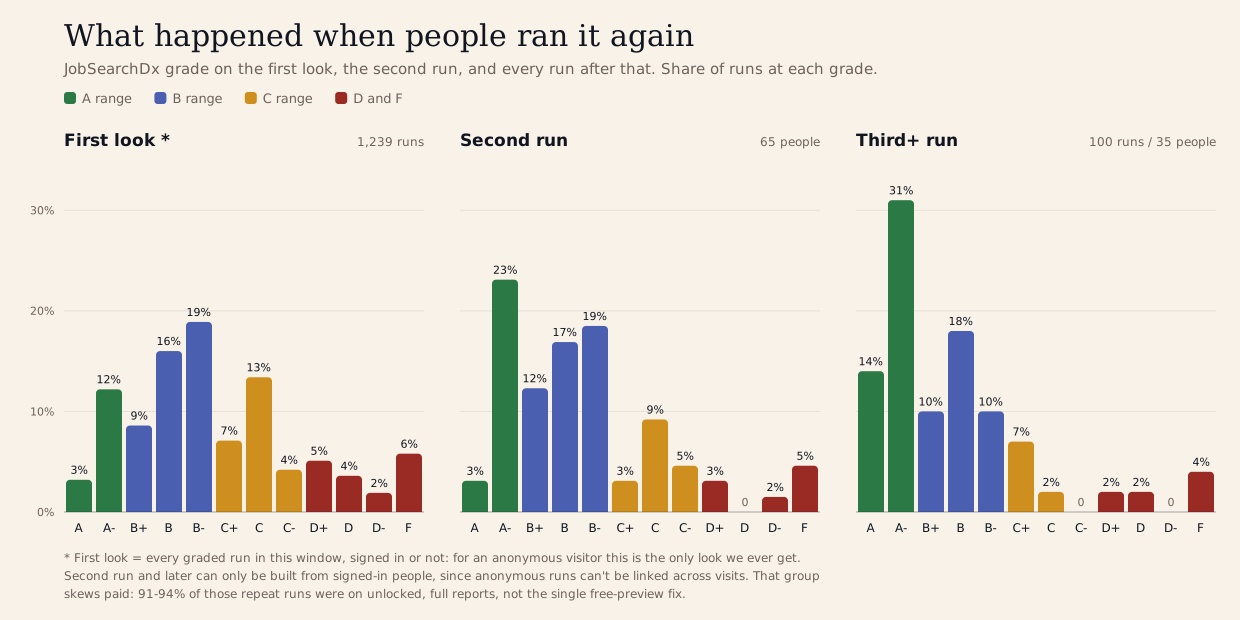
JobSearchDx grades on the first look, the second run, and every run after.
The D and F share drops from 6% to 5% to 4% run over run. The A range climbs from 15% to 26% to 45%. That first panel is every one of the 1,239 runs in this window, so it's the real spread, not a cherry-picked slice. The second and third panels can only be built from people who were signed in, since an anonymous run can't be linked to the next one, and that group skews paid: 91 to 94% of those repeat runs were on fully unlocked reports, working from the whole list of what was wrong, not just the one free fix. Small numbers on the far end (35 people account for the third-plus panel), and I can't see exactly what each person changed. But the direction only goes one way, run after run.
So the picture is this. Most people's profiles point at the wrong kind of job. The fix is a handful of fields. And people who go fix them get somewhere fast.
Things you can do right now
This is the process I used. A lot of it can be done in less than an hour, which is less than you'd spend tailoring a resume for one posting.
- Pull three to five real postings. If you've gotten to late rounds for a few jobs, use those. You were clearly doing something right for them, and that's the shape to build on. If not, use three to five goal jobs, the ones you'd actually take, posted now. Not one. Not the dream role.
- Find what repeats. Read them side by side. Which titles, responsibilities, skills, and tools show up in more than one? That overlap is the shape of the job you want. It's also what a recruiter's filters are built from.
- Read your profile like a stranger. Can someone who doesn't know you tell what you do from your headline and your current job title alone? Does the title recruiters would search for appear in both, and do the two match? If your company gave you a creative title, this is where it's costing you. Keep the official title and put the market-standard version next to it.
- Move the work up. The first couple of lines of your About are all most people see before "see more." Your current role gets read; a role from 2019 doesn't. If the work those postings describe lives low on your profile, bring it up.
- Say only what's true. If the postings ask for something you've done, make it visible. If they ask for something you haven't, leave it. A posting that wants something you don't have is a fit question, not a wording question.
- Set Open to Work. Titles, locations, workplace type. Recruiters only, if you're employed. LinkedIn says this affects whether you appear in searches, so it's the easiest thing on this list.
- Then, and only then, touch your resume. One version per kind of job. Not one per posting.
Everything above is about being findable, and that's huge. It's how the right recruiters end up in your inbox instead of the wrong ones. It's a separate question from what a human sees once they land on your profile. That part matters too: it should be obvious what you do, and you want a real profile picture and a customized banner instead of the default. That's a topic for another day.
If you want a shortcut
You can do all of this by hand. If you'd rather not, JobSearchDx does the comparison in about two minutes: paste your profile, paste the jobs, and it tells you what I'd look at first. Your first fix is free.
About this analysis
JobSearchDx compares the text of a LinkedIn profile with the job descriptions a person is targeting and flags where the profile appears more or less aligned with that market. As of September 26, 2026, it had logged 1,484 comparisons. The diagnostic changed during June 2026, so the numbers above use the 1,239 comparisons from June 22 onward that produced a score, excluding my own test runs. Comparisons are not unique people; some people ran it more than once. The repeat analysis covers 221 people who ran it while signed in, 65 of whom ran it more than once. For each run the tool keeps the score, how many job descriptions were pasted, and what the audit flagged. It never stores the profile or the job descriptions, and nothing in this article can identify a person. These are observational data. JobSearchDx has no access to LinkedIn's search ranking, and this dataset does not include recruiter views, outreach, interviews, or hires.
Statements about LinkedIn Recruiter come from LinkedIn's own Help and Recruiter Help documentation, checked September 26, 2026:
- Recruiter and Recruiter Lite search filters and definitions
- Filter search results in Recruiter and Recruiter Lite
- AI Search and Projects in Recruiter
- Advanced AI-Assisted Search in Recruiter
- Skills filter in Recruiter and Recruiter Lite
- Let recruiters know you're Open to Work
- View candidates who are Open to Work in Recruiter